A Complete Guide to Mechanical Keyboard Switches: Choosing from Blue Switches to Electrostatic Capacitive Switches
The true soul of a mechanical keyboard lies in the tiny switches beneath each keycap.
Have you ever wondered why mechanical keyboards range in price from tens to thousands of yuan? Or why some people type with effortless fluency, while others’ keyboards click loudly? The answers all lie in the keyboard’s core component—the switches.
Different switches deliver drastically different feels, sounds, and suitability for scenarios. From classic Cherry MX switches to the rise of domestic Chinese switches in recent years, and high-end electrostatic capacitive technology, the world of mechanical keyboard switches is both complex and fascinating.
This article will take you deep into the mysteries of keyboard switches, helping you find the perfect one among countless options.
01 Switch Basics: Three Types Define Core Feel
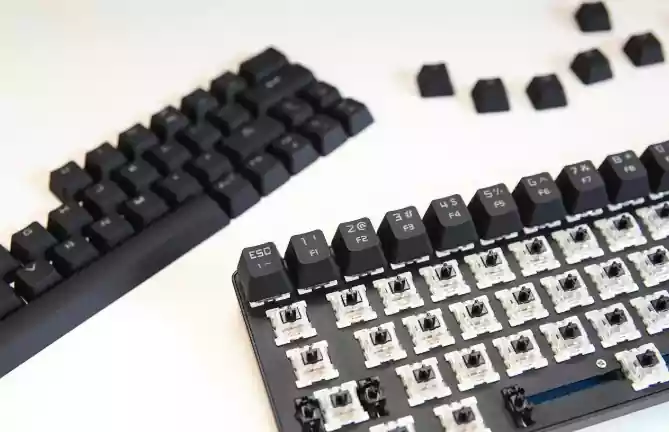
Switches are the core switching mechanisms of mechanical keyboards—each keycap sits atop an independent switch, which determines the force required to press the key, its travel distance, and most critically, the feel and sound feedback. Unlike membrane keyboards, which offer uniform feel via a single rubber membrane, mechanical keyboards feature independent switching mechanisms for each key.
Mechanical switches fall into three main categories: linear, tactile, and silent switches. Each type has unique tactile characteristics and ideal use cases.
Linear switches provide a straight-up-and-down key press experience with no resistance changes or "tactile bumps" during actuation. Red and Black switches are classic examples—their smooth, lightweight feel suits scenarios requiring rapid, consecutive key presses.
Tactile switches feature distinct "phased" changes during actuation, offering clear tactile feedback. Blue and Brown switches are typical tactile switches: Blue switches have the strongest tactile bump and loudest sound, while Brown switches are milder.
Silent switches reduce typing noise through special designs (e.g., silicone pads at the switch base), making them ideal for users needing quiet environments. Silent Red and Silent Brown switches are representative, cutting noise by over 60%.
Understanding these basic differences is the first step to choosing the right keyboard. Next, we’ll dive into the specific characteristics of each switch type.
02 Classic Cherry MX Switches: The Industry’s Gold Standard
Cherry MX switches are revered as the "grandfathers of mechanical keyboards." Their classic Black, Red, Blue, and Brown switches once defined mechanical keyboard standards. Years of production experience and technical expertise ensure stability and long lifespan.
Blue switches (Click Switch)
Blue switches are the most iconic tactile switches—earning the nickname "roommate-punching switches" for good reason. They have an intense tactile bump and a crisp, loud "click" sound, with obvious feedback on every press.
With an actuation force of approximately 50gf, Blue switches suit users who love strong rhythmic and auditory feedback, especially writers and programmers. However, their loud noise makes them unsuitable for offices or dorms requiring quiet.
Brown switches (Tactile Switch)
Brown switches are often called "all-rounders," sitting between linear and tactile switches. They have a mild tactile bump with lower noise, an actuation force of about 45gf, offering feedback without being overly loud.
Described as "matte version" Blue switches or feeling like "pressing on rubber," they’re an excellent choice for users transitioning from membrane keyboards—especially those balancing gaming and typing.
Red switches (Linear Switch)
Red switches represent lightweight linear switches, with an actuation force of around 45gf, no tactile bump, and a lightweight, quiet feel. Currently one of the most popular switches, they suit long gaming sessions and typing, particularly beginners.
Their soft feel and low noise make them versatile for both gaming and quiet offices— a safe choice for many new keyboard users.
Black switches (Linear Switch)
Black switches can be thought of as "heavy-duty" Red switches—linear switches with higher actuation force (around 60gf). They offer stronger rebound, suiting gamers with stronger hand strength who prefer a solid feel.
However, their heavy feel can cause fatigue during long use, making them less mainstream today. They’re better for responsive gamers who enjoy firm keystrokes.
03 The Rise of Domestic Chinese Switches: High Value and Innovation
In recent years, domestic Chinese switches have made significant strides in quality and innovation. Brands like TTC, Kailh, and Gateron now match Cherry in smoothness and durability, with higher 性价比 (cost-effectiveness).
Kailh switches leverage strong R&D capabilities to (launch) the water-resistant BOX series—e.g., BOX White switches excel in feel and performance.
Gateron switches are known for (smooth tactile feedback) and reasonable pricing. Their G White Pro switches suit typing and long-term use, enjoying a strong reputation among users.
TTC switches, a veteran manufacturer, offer stable quality—their silent switches perform exceptionally in offices. Silent Sea Salt switches are quiet yet provide good feedback, ideal for frequent typists in office settings.
The rise of domestic switches has expanded user choices, particularly in custom mechanical keyboards, where their diversity and value have gained widespread popularity.
04 Key Technical Parameters: Understanding Feel Behind the Data
Knowing a few key parameters helps pinpoint the right feel when choosing switches.
Actuation force is the minimum force needed to press a keycap, typically 25g to 55g. Light-force switches (e.g., Red) suit long use; heavy-force switches (e.g., Black) offer distinct feel but may cause fatigue.
Actuation travel is the distance from rest to signal activation, ranging from 1.0mm to 2.2mm. Short-travel switches (1.0-1.6mm) actuate faster, ideal for gamers; long-travel switches (1.6-2.0mm) provide stronger confirmation, suiting office work and typing.
Switch material also affects feedback: POM is smooth, suiting users seeking a silky feel; PC and nylon offer crisper sound. Nylon’s heat resistance allows it to withstand high-temperature wave soldering, often used for non-hot-swappable keyboard switch housings.
Understanding these parameters, combined with your needs and preferences, helps make informed choices among countless switches.
05 Scenario-Based Selection Guide: Finding Your Perfect Switch
Different scenarios demand different switches—here are recommendations for common use cases.
Gaming
For gamers, especially competitive players, fast response is paramount. Silver switches, with ultra-short actuation travel (1.2mm), are top choices but prone to accidental presses. Red switches are safer—fast-actuating and light, suiting long gaming sessions. Black switches suit gamers with stronger hand strength who prefer firm presses.
Typing/Office
Writers need comfort and rhythm. Blue switches offer the strongest typing rhythm but are noisy—only suitable for private offices or home use. Brown switches are ideal for shared offices, providing feedback without disturbing others. Silent Red or Silent Brown switches are the quietest options (over 60% noise reduction), perfect for shared spaces requiring absolute quiet.
All-Rounder Use
For balancing gaming, typing, and daily use, Brown switches strike the best balance. TTC Golden Powder switches (37cN force) are lighter alternatives, ideal for users seeking ultra-light feel.
Beginners unsure of their preference will find Red and Brown switches safe starting points, suiting 80% of users. Purchasing a switch tester (¥20-30) or choosing a hot-swappable keyboard lets you experience different switches firsthand before deciding.
06 Electrostatic Capacitive & Special Switches: High-End and Niche Solutions
Beyond traditional mechanical switches, the keyboard market offers high-end and specialized switch technologies for specific user groups.
Electrostatic capacitive keyboards use a different actuation principle—detecting changes in electrostatic capacitance between electrodes to trigger keystrokes. Without physical contact friction, they boast longer lifespans, faster response, and better noise control.
Their feel comes from elastic silicone bowls, with non-linear force curves—soft with a mild tactile bump, similar to Brown switches. Brands offer 30g, 45g, and 55g force options to suit different preferences.
Low-profile switches (e.g., Cherry MX Low Profile) have shorter travel, ideal for portable laptop users as compact alternatives to traditional mechanical switches.
For users with specific needs, these high-end and special switches offer more diversity. Though often pricier, their unique experience justifies investment for niche groups.
From internet cafes in Guangzhou to tech companies in Silicon Valley, the click of mechanical keyboards has witnessed the evolution of the digital age. Small as they are, switches are among the most direct interfaces between humans and machines.
Choosing keyboard switches is like choosing well-fitting shoes—the best isn’t necessarily the most expensive, but the one that suits you. Whether you’re a Blue switch enthusiast chasing crisp rhythm or a Red switch user preferring soft smoothness, there’s always a switch that perfectly matches your needs and preferences.
In the world of mechanical keyboards, there’s no "best" switch—only the "most suitable" choice.